讲座 1
- 欢迎!
- 源代码
- Visual Studio Code for CS50
- 你好 世界
- From Scratch to C
- 头文件 and CS50 手册页面
- 你好, You
- Linux
- 条件语句
- 类型
- 格式代码
- 变量
- compare.c
- agree.c
- 循环 and meow.c
- 函数
- 正确性、设计、风格
- Mario
- 运算符
- 总结
欢迎!
- 在上一节课中,我们学习了 Scratch,一种可视化编程语言。
- 学习计算机科学的概念可能相当具有挑战性。确实,有时你会感觉像是在用消防水管喝水。记住:最终重要的是你在接下来的几周和几个月里通过在这门课程中的努力学习和研究所取得的进步。
- 当然,你在 Scratch 中学到的所有重要编程概念都将在你学习如何用任何编程语言编程时用到。Scratch 中的函数、条件判断、循环和变量是你在任何编程语言中都会遇到的基本构建块。
源代码
- 回想一下,机器只理解二进制。人类编写的是源代码,一份计算机可读的指令列表,而机器只理解我们现在所称的机器码。这种机器码是一种由 0 和 1 组成的模式,能够产生所需的效果。
-
事实证明,我们可以使用一种非常特殊的软件,称为编译器,将源代码转换为机器码。今天,我们将向你介绍一个编译器,它能让你将编程语言 C 中的源代码转换为机器码。
flowchart LR in["源代码"] --> BOX[" compiler "] BOX --> out["machine code"] - 今天,除了学习如何编程之外,你还将学习如何编写好的代码。
Visual Studio Code for CS50
- 本课程使用的文本编辑器是 Visual Studio Code,简称 VS Code,亲切地被称为 cs50.dev,可以通过该网址访问。
- 我们使用 VS Code 的一个重要原因是它已经预装了本课程所需的所有软件。本课程及其说明都是针对 VS Code 设计的。
- 在自己的电脑上手动安装课程所需的软件是一件麻烦事。最好始终使用 VS Code 来完成本课程的所有作业。
- 你可以在 cs50.dev 打开 VS Code。
-
IDE 可以划分为几个区域:
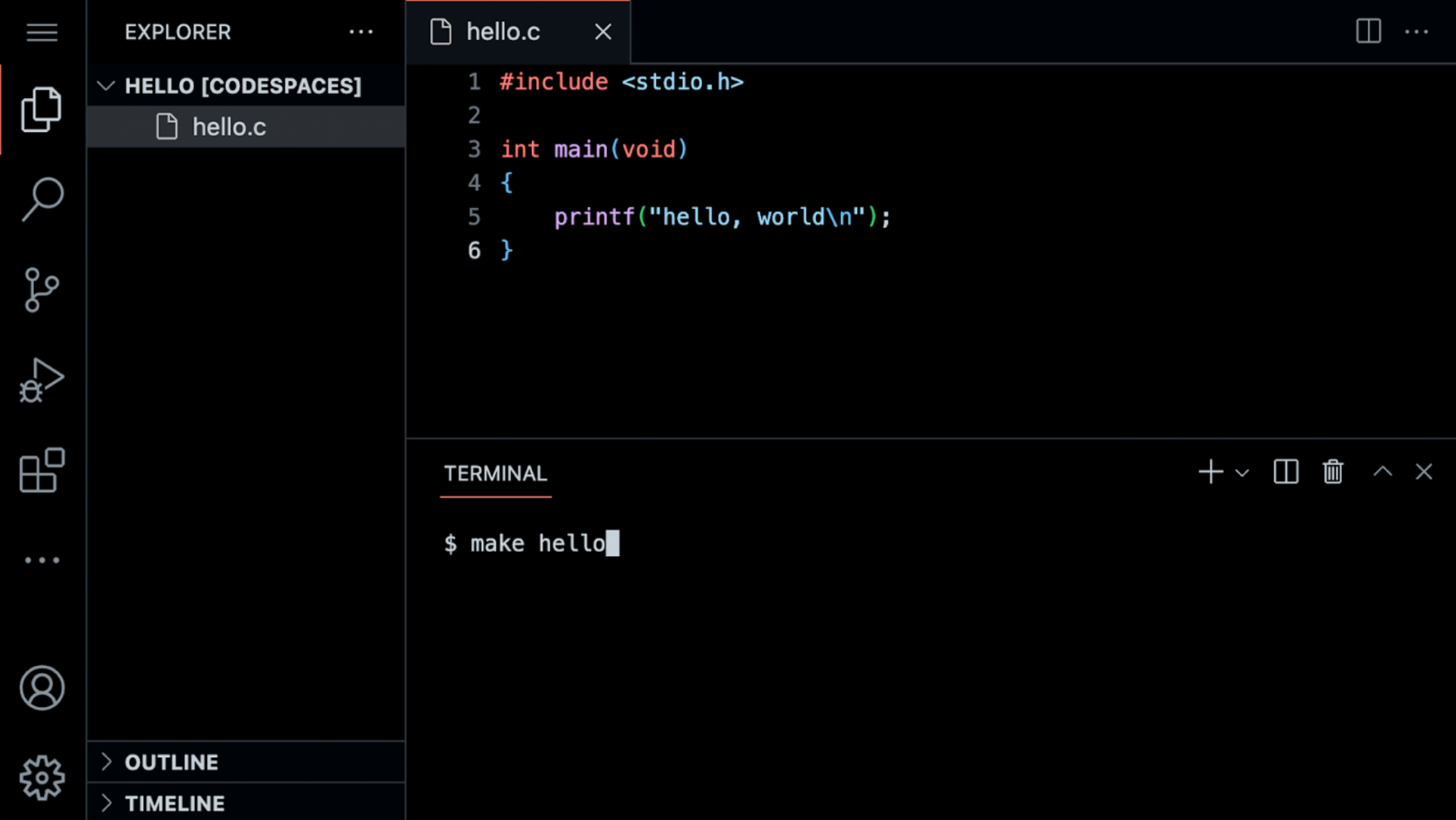 请注意,左侧有一个文件浏览器,你可以在其中找到你的文件。此外,中间有一个称为文本编辑器的区域,你可以在其中编辑你的程序。最后,还有一个
命令行界面,称为 CLI、命令行或终端窗口,我们可以在其中向云端计算机发送命令。 - 你还会注意到在左侧栏的图形用户界面 (GUI) 中有各种工具和一个文件浏览器。
- 因为这个 IDE 预配置了所有必要的软件,你应该使用它来完成本课程的所有作业。
你好 世界
-
我们将使用三个命令来编写、编译和运行我们的第一个程序:
code hello.c

make hello

./hello
第一个命令
code hello.c创建一个文件,并允许我们输入这个程序的指令。第二个命令make hello编译我们 C 语言指令中的文件,并创建一个名为hello的可执行文件。最后一个命令./hello运行名为hello的程序。 -
我们可以通过在终端窗口中输入
code hello.c来构建你的第一个 C 程序。请注意,我们故意将整个文件名设为小写,并包含了.c扩展名。然后,在出现的文本编辑器中,编写如下代码:// 一个向世界问好的程序 #include <stdio.h> int main(void) { printf("hello, world\n"); }请注意,上面每一个字符都有其作用。如果你输入错误,程序将无法运行。
printf是一个可以输出一行文本的函数。注意引号和分号的位置。此外,请注意\n在hello, world之后创建了一个新行。 - 在终端窗口中按下回车键后,你可以通过执行
make hello来编译你的代码。请注意,我们省略了.c。make是一个构建工具,它将会编译我们的hello.c文件,并将其转换为一个名为hello的程序。如果执行此命令没有产生任何错误,你就可以继续。如果有错误,请仔细检查你的代码,确保与上面的代码一致。 - 现在,输入
./hello,你的程序将执行并显示hello, world。 - 现在,打开左侧的文件浏览器。你会注意到现在有名为
hello.c的文件和另一个名为hello的文件。hello.c包含你的源代码,可供人类和编译器阅读。hello是一个包含机器码的可执行文件,计算机可以直接运行它。
从 Scratch 到 C
- 在 Scratch 中,我们使用
say积木块在屏幕上显示任何文本。确实,在 C 语言中,我们有一个名为printf的函数,它做的正是这件事。 -
请注意,我们的代码已经调用了这个函数:
printf("hello, world\n");请注意,printf 函数被调用了。传递给 printf 的参数是
hello, world\n,用双引号括起来。这行代码以;结束。 -
代码中的错误很常见,特别是关于分号和引号等语法方面。请按以下方式修改你的代码:
// \n is missing #include <stdio.h> int main(void) { printf("hello, world"); }请注意,
\n现在没有了。 - 在你的终端窗口中,运行
make hello。因为你修改了你的程序,你必须重新编译你的程序。 - 在终端窗口中输入
./hello,你的程序改变了吗?这个\字符被称为转义字符,它告诉编译器\n是一个特殊的指令,用于创建一个换行。 -
还有其他可以使用的转义字符:
\n 创建一个新行 \r 返回到行首 \" 打印一个双引号 \' 打印一个单引号 \\ 打印一个反斜杠 -
将你的程序恢复为以下内容:
// 一个向世界问好的程序 #include <stdio.h> int main(void) { printf("hello, world\n"); }请注意,分号和
\n已经被恢复。
头文件和 CS50 手册页面
- 代码开头的语句
#include <stdio.h>是一个非常特殊的命令,它告诉编译器你想要使用名为stdio.h的库的功能,这是一个头文件。这允许你使用printf函数以及许多其他功能。注意,它不是叫 studio:而是stdio.h。 - 一个库是由别人创建的代码集合。库是别人过去编写的预写代码和函数的集合,我们可以在我们的代码中使用它们。
- 你可以在手册页面上阅读关于此库的所有功能。手册页面提供了一种更好地理解各种命令的功能及其工作原理的方式。
-
原来,CS50 有自己的库,名为
cs50.h。它包含了许多函数,在你刚开始学习 C 时提供辅助轮:get_char get_double get_float get_int get_long get_string - 这些库已经在 cs50.dev 为你预装好了。如果你试图在自己的电脑上使用这些库,你可能需要安装它们。这就是你为什么应该在本课程中使用 cs50.dev,因为它已经为你安装了所有必要的软件。
- 让我们在你的程序中使用这个库。
你好,You
- 回想一下,在 Scratch 中,我们可以询问用户“你的名字是什么?”,然后说“你好”并附上那个名字。
-
在 C 语言中,我们可以做同样的事情。请按以下方式修改你的代码:
// get_string and printf with incorrect placeholder #include <cs50.h> #include <stdio.h> int main(void) { string answer = get_string("What's your name? "); printf("hello, answer\n"); }get_string函数用于从用户那里获取一个字符串。然后,变量answer被传递给printf函数。 - 在终端窗口中再次运行
make hello,你会发现出现了许多错误。 -
查看这些错误,
string和get_string没有被编译器识别。我们需要通过添加一个名为cs50.h的库来向编译器提供这些定义。此外,我们注意到answer并没有像我们预期的那样被提供。请按以下方式修改你的代码:// get_string and printf with %s #include <cs50.h> #include <stdio.h> int main(void) { string answer = get_string("What's your name? "); printf("hello, %s\n", answer); }get_string函数用于从用户那里获取一个字符串。然后,变量answer被传递给printf函数。%stells theprintffunction to prepare itself to receive astring. - 现在,在终端窗口中再次运行
make hello,你可以通过输入./hello来运行你的程序。程序现在会询问你的名字,然后按照预期附上你的名字说“你好”。 -
answer是一个我们称之为变量的特殊存储位置。answer的类型是string,可以在其中存储任何字符串。有许多数据类型,如int、bool、char等等。 -
%s是一个称为格式码的占位符,它告诉printf函数准备接收一个string。answer是传递给%s的string。
Linux
- 我们一直在使用 CLI 来
make和运行我们的程序。 - CLI 在执行命令和处理文件时通常比 GUI 更有用。
- 在终端窗口/CLI 中,我们可能会用到的一些常用命令包括:
-
cd, for changing our current directory (folder) -
cp, for copying files and directories -
ls, for listing files in a directory -
mkdir, for making a directory -
mv, for moving (renaming) files and directories -
rm, for removing (deleting) files -
rmdir, for removing (deleting) directories
-
- 最常用的是
ls,它会列出当前目录中的所有文件。在终端窗口中输入ls然后按enter。你会看到当前文件夹中的所有文件。
条件语句
- 你在 Scratch 中使用的另一个构建块是条件判断。例如,如果 x 大于 y,你可能想做一件事。此外,如果该条件不满足,你可能想做其他事情。
- 我们来看几个来自 Scratch 的例子。
-
在 C 语言中,你可以按以下方式比较两个值:
// 条件语句 that are mutually exclusive

if (x < y)
{
    printf("x is less than y\n");
}
else
{
    printf("x is not less than y\n");
}
注意到当
x < y时,会产生一个结果。如果x不小于y,则会产生另一个结果。 -
同样,我们可以为三种可能的结果做规划:
// Conditional that isn't necessary

if (x < y)
{
    printf("x is less than y\n");
}
else if (x > y)
{
    printf("x is greater than y\n");
}
else if (x == y)
{
    printf("x is equal to y\n");
}
注意,并非所有这些代码行都是必需的。我们如何消除上面不必要的计算?
-
你可能已经猜到我们可以按以下方式改进这段代码:
// Compare integers

if (x < y)
{
    printf("x is less than y\n");
}
else if (x > y)
{
    printf("x is greater than y\n");
}
else
{
    printf("x is equal to y\n");
}
注意最后一条语句被替换成了
else。
类型
-
C 语言中有许多可用的数据类型:
bool
char
float
int
long
string
...
格式代码
- 早些时候,你可能记得我们在
printf中使用了占位符%s来表示字符串。这个占位符被称为格式码。 -
printf支持许多格式码。以下是你在本课程中可能会用到的一些:%c %f %i %li %s%c用于char(字符)变量。%f用于float(浮点数)变量。%i用于int或整数变量。%li用于long整数变量。%s用于string变量。你可以在手册页面上了解更多关于此内容的信息。 - 我们将在本课程中使用许多 C 语言可用的数据类型。
变量
-
在 C 语言中,你可以按以下方式为
int或整数赋值:int counter = 0;注意,名为
counter、类型为int的变量被赋值为0。 -
C 语言也可以按以下方式编程,将
counter加 1:counter = counter + 1;注意,
1被加到了counter的值上。 -
这也可以表示为:
counter += 1; -
这可以进一步简化为:
counter++;注意
++是如何用来加 1 的。 -
你也可以按以下方式将
counter减 1:counter--;注意,在这种语法中,
1从counter的值中减去了。
compare.c
- 利用这些关于如何为变量赋值的新知识,你可以编写你的第一个条件判断语句。
-
在终端窗口中,输入
code compare.c并编写如下代码:// Conditional, Boolean expression, relational operator #include <cs50.h> #include <stdio.h> int main(void) { // Prompt user for integers int x = get_int("What's x? "); int y = get_int("What's y? "); // Compare integers if (x < y) { printf("x is less than y\n"); } }注意,我们创建了两个变量,一个名为
x的int或整数,另一个名为y。这些变量的值是使用get_int函数填充的。 - 你可以通过在终端窗口中执行
make compare,然后执行./compare来运行你的代码。如果你收到任何错误消息,请检查你的代码是否有错误。 -
我们可以按以下方式编码来改进你的程序:
// 条件语句

#include <cs50.h>
#include <stdio.h>

int main(void)
{
    // Prompt user for integers
    int x = get_int("What's x? ");
    int y = get_int("What's y? ");

    // Compare integers
    if (x < y)
    {
        printf("x is less than y\n");
    }
    else if (x > y)
    {
        printf("x is greater than y\n");
    }
    else
    {
        printf("x is equal to y\n");
    }
}
注意,所有可能的结果现在都被考虑到了。
- 你可以重新 make 和重新运行你的程序并进行测试。
- 在各种流程图中检查这些程序,你可以看到我们代码设计决策的效率。几乎任何代码块都可以转换为可视化形式。
agree.c
- 考虑另一种名为
char的数据类型,我们可以通过在终端窗口中输入code agree.c来开始一个新程序。 string是一系列字符,而char是单个字符。-
在文本编辑器中,编写如下代码:
// Comparing against lowercase char

#include <cs50.h>
#include <stdio.h>

int main(void)
{
    // Prompt user to agree
    char c = get_char("Do you agree? ");

    // Check whether agreed
    if (c == 'y')
    {
        printf("Agreed.\n");
    }
    else if (c == 'n')
    {
        printf("Not agreed.\n");
    }
}
注意,单引号用于单个字符(
char类型),而双引号用于字符串。另外,请注意==确保某个东西等于另一个东西,而单个等号在 C 语言中有完全不同的功能。 - 你可以通过在终端窗口中输入
make agree,然后输入./agree来测试你的代码。 -
我们还可以允许输入大写和小写字符:
// Comparing against lowercase and uppercase char

#include <cs50.h>
#include <stdio.h>

int main(void)
{
    // Prompt user to agree
    char c = get_char("Do you agree? ");

    // Check whether agreed
    if (c == 'y')
    {
        printf("Agreed.\n");
    }
    else if (c == 'Y')
    {
        printf("Agreed.\n");
    }
    else
    {
        printf("Not agreed.\n");
    }
}
注意,提供了额外的选项。然而,这不是高效的代码。
-
我们可以按以下方式改进这段代码:
// Logical operators

#include <cs50.h>
#include <stdio.h>

int main(void)
{
    // Prompt user to agree
    char c = get_char("Do you agree? ");

    // Check whether agreed
    if (c == 'Y' || c == 'y')
    {
        printf("Agreed.\n");
    }
    else
    {
        printf("Not agreed.\n");
    }
}
注意,
||有效地表示或。
循环 and meow.c
- 我们也可以在我们的 C 程序中使用来自 Scratch 的循环构建块。
-
在你的终端窗口中,输入
code meow.c并编写如下代码:// Opportunity for better design #include <stdio.h> int main(void) { printf("meow\n"); printf("meow\n"); printf("meow\n"); }注意,这个程序按照预期执行,但有更好设计的机会。代码被反复重复。
-
我们可以通过按以下方式修改你的代码来改进我们的程序:
// Better design

#include <stdio.h>

int main(void)
{
    int i = 3;
    while (i > 0)
    {
        printf("meow\n");
        i--;
    }
}
注意,我们创建了一个名为
i的int变量,并将其赋值为3。然后,我们创建了一个while循环,只要i > 0,它就会一直运行。然后,循环开始运行。每次使用i--语句从i中减去1。 -
同样,我们可以通过按以下方式修改代码来实现一种计数增加:
// Print values of i

#include <stdio.h>

int main(void)
{
    int i = 1;
    while (i <= 3)
    {
        printf("meow\n");
        i++;
    }
}
注意,我们的计数器
i从1开始。每次循环运行时,它会将计数器增加1。一旦计数器大于3,它将停止循环。 -
通常,在计算机科学中,我们从零开始计数。最好按以下方式修改你的代码:
// Better design

#include <stdio.h>

int main(void)
{
    int i = 0;
    while (i < 3)
    {
        printf("meow\n");
        i++;
    }
}
注意,我们现在从零开始计数。
- 我们工具箱中另一个用于循环的工具是
for循环。 -
你可以使用
for循环进一步改进我们meow.c程序的设计。请按以下方式修改你的代码:// Better design #include <stdio.h> int main(void) { for (int i = 0; i < 3; i++) { printf("meow\n"); } }注意,
for循环包含三个参数。第一个参数int i = 0将我们的计数器设置为零。第二个参数i < 3是正在检查的条件。最后,参数i++告诉循环每次运行时增加 1。 -
我们甚至可以使用以下代码永远循环:
// Infinite loop

#include <cs50.h>
#include <stdio.h>

int main(void)
{
    while (true)
    {
        printf("meow\n");
    }
}
注意,
true将始终为真。因此,代码将始终运行。运行这段代码你将失去对终端窗口的控制。你可以通过在键盘上按control-C来中断无限循环(这会发送 SIGINT 信号来终止程序)。 -
我们可以通过按以下方式修改代码来询问用户要叫多少次:
// Prompts user for n.

#include <cs50.h>
#include <stdio.h>

int main(void)
{
    int n = get_int("What's n? ");

    for (int i = 0; i < n; i++)
    {
        printf("meow\n");
    }
}
注意,
n由用户定义。然后,发出n次 meow。 -
如果用户输入了小于零的数字会发生什么?请按以下方式修改你的代码:
// Prompts user again if need be. (Poor design.)

#include <cs50.h>
#include <stdio.h>

int main(void)
{
    int n = get_int("What's n? ");
    if (n < 0)
    {
        n = get_int("What's n? ");
    }

    for (int i = 0; i < n; i++)
    {
        printf("meow\n");
    }
}
注意,这可能会阻止用户一次性输入小于零的数字。但如果他们多次这样做会发生什么?
-
按以下方式改进你的代码:
// Uses a loop with continue/break.

#include <cs50.h>
#include <stdio.h>

int main(void)
{
    int n;
    while (true)
    {
        n = get_int("What's n? ");
        if (n < 0)
        {
            continue;
        }
        else
        {
            break;
        }
    }

    for (int i = 0; i < n; i++)
    {
        printf("meow\n");
    }
}
注意,
while循环将一直运行,直到n大于或等于零。 -
不过,这段代码还可以进一步改进:
// Uses a loop with just break.

#include <cs50.h>
#include <stdio.h>

int main(void)
{
    int n;
    while (true)
    {
        n = get_int("What's n? ");
        if (n >= 0)
        {
            break;
        }
    }

    for (int i = 0; i < n; i++)
    {
        printf("meow\n");
    }
}
注意我们之前的代码是如何简化的,移除了不必要的代码行。
-
与
while循环类似,我们可以使用do-while循环来实现这段代码:// Uses a do-while loop instead. #include <cs50.h> #include <stdio.h> int main(void) { int n; do { n = get_int("What's n? "); } while (n < 0); for (int i = 0; i < n; i++) { printf("meow\n"); } }注意,
do至少会运行一次。那部分代码在n小于零时会一直循环。 - 一个批判性的眼光可能会发现我们可以抽象出发出 meow 声音的那部分代码。
函数
-
虽然我们之后会提供更多指导,但你可以按以下方式在 C 语言中创建你自己的函数:
void meow(void)
{
    printf("meow\n");
}
开头的
void表示该函数不返回任何值。(void)表示没有向该函数提供任何值。 -
该函数可以按以下方式在 main 函数中使用:
// 抽象

#include <stdio.h>

void meow(void);

int main(void)
{
    for (int i = 0; i < 3; i++)
    {
        meow();
    }
}

// Meow once
void meow(void)
{
    printf("meow\n");
}
注意,
meow函数通过meow()指令被调用。这是可能的,因为meow函数被定义在代码的底部,而该函数的原型作为void meow(void)提供在代码的顶部。 -
你的
meow函数可以进一步修改以接受输入:// 抽象 with parameterization #include <stdio.h> void meow(int n); int main(void) { meow(3); } // Meow some number of times void meow(int n) { for (int i = 0; i < n; i++) { printf("meow\n"); } }注意,原型已更改为
void meow(int n),以表明meow接受一个int作为其输入。 -
在使用变量和函数时,理解变量的作用域很重要。请看以下代码:
// 演示nstrates scope

#include <stdio.h>

void meow(int n);

int main(void)
{
    int n = 3;
    meow(n);
}

// Meow some number of times
void meow(int n)
{
    for (int i = 0; i < n; i++)
    {
        printf("meow\n");
    }
}
注意,
n在main函数中被定义。因此,n仅在main函数的作用域内。meow函数能够使用n的唯一方式是n的一个副本被传递给meow函数。meow并没有使用来自main函数的原始n。相反,它使用的是它自己的n副本。 -
通过对我们的代码进行一些修改,我们可以获取用户输入:
// User input

#include <cs50.h>
#include <stdio.h>

void meow(int n);

int main(void)
{
    int n;
    do
    {
        n = get_int("Number: ");
    }
    while (n < 1);
    meow(n);
}

// Meow some number of times
void meow(int n)
{
    for (int i = 0; i < n; i++)
    {
        printf("meow\n");
    }
}
注意,使用
get_int从用户那里获取一个数字。n被传递给meow。 -
我们甚至可以测试来确保我们从用户那里获取的输入是正确的:
// Return value

#include <cs50.h>
#include <stdio.h>

int get_positive_int(void);
void meow(int n);

int main(void)
{
    int n = get_positive_int();
    meow(n);
}

// Get number of meows
int get_positive_int(void)
{
    int n;
    do
    {
        n = get_int("Number: ");
    }
    while (n < 1);
    return n;
}

// Meow some number of times
void meow(int n)
{
    for (int i = 0; i < n; i++)
    {
        printf("meow\n");
    }
}
注意,一个名为
get_positive_int的新函数在n < 1时不断询问用户输入一个整数。在获得一个正整数后,该函数将return n返回给main函数。
正确性、设计、风格
- 代码可以从三个维度进行评估。
- 第一,正确性指的是“代码是否按预期运行?”你可以使用
check50来检查代码的正确性。 - 第二,设计指的是“代码的设计如何?”你可以使用
design50来评估代码的设计。 - 最后,风格指的是“代码的美观性和一致性如何?”你可以使用
style50来评估代码的风格。
Mario
- 今天我们讨论的所有内容都聚焦于作为新晋计算机科学家你工作中的各种构建块。
- The following will help you orient toward working on一个问题集 for this class in general: How does one approach a 计算机科学-related problem?
-
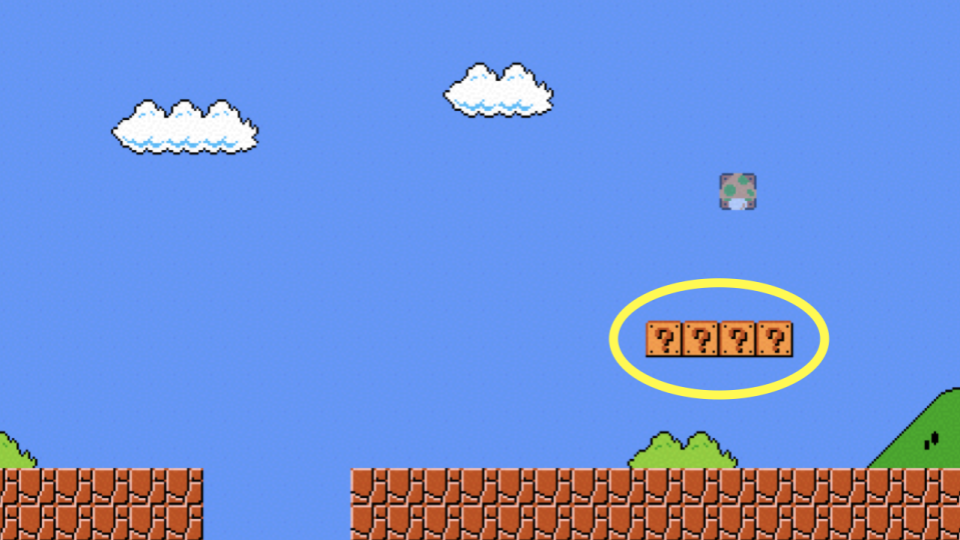
假设我们想要模拟超级马里奥兄弟游戏的视觉效果。考虑图中的四个问号块,我们如何创建大致表示这四个水平块的代码?
-
在终端窗口中,输入
code mario.c并编码如下:// Prints a row of 4 question marks #include <stdio.h> int main(void) { printf("????\n"); }注意,打印了四个问号。
-
使用循环,我们可以更高效地打印问号:
// Prints a row of 4 question marks with a loop

#include <stdio.h>

int main(void)
{
    for (int i = 0; i < 4; i++)
    {
        printf("?");
    }
    printf("\n");
}
注意,在这里通过循环打印了四个问号。
-
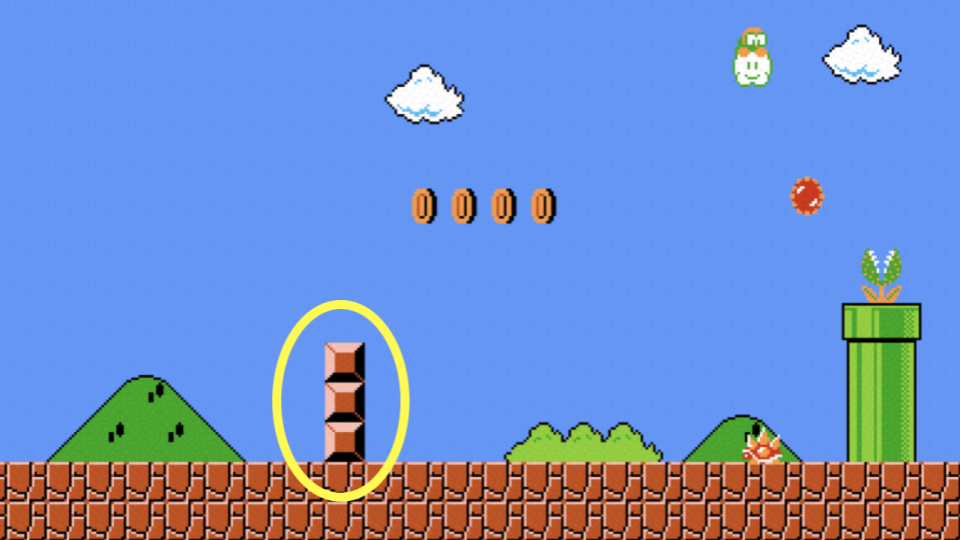
同样,我们可以应用同样的逻辑来创建三个垂直块。
-
要实现这一点,请按以下方式修改你的代码:
// Prints a column of 3 bricks with a loop

#include <stdio.h>

int main(void)
{
    for (int i = 0; i < 3; i++)
    {
        printf("#\n");
    }
}
注意,通过循环打印了三个垂直砖块。
-
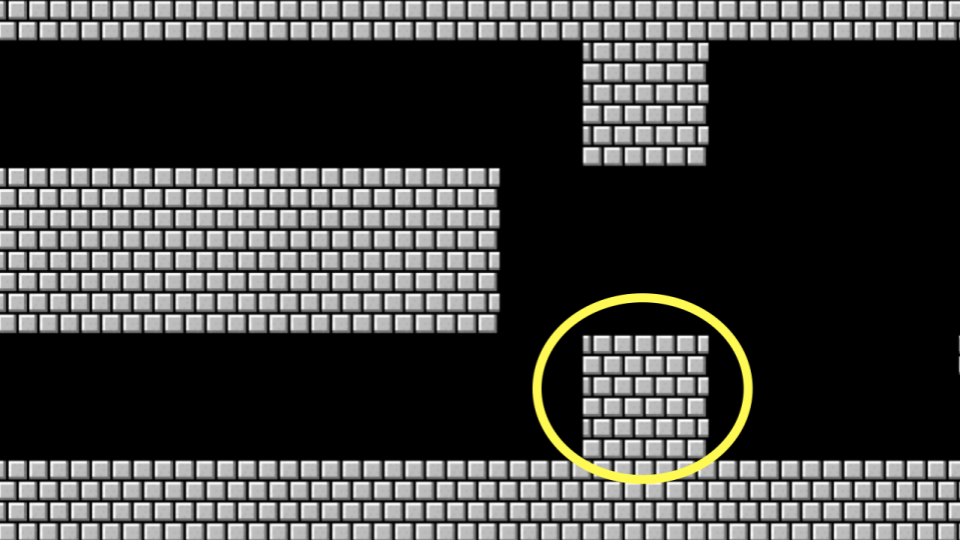
如果我们想要结合这些想法来创建一个 3x3 的块组会怎样?
-
我们可以按照上面的逻辑,结合同样的想法。请按以下方式修改你的代码:
// Prints a 3-by-3 grid of bricks with nested loops

#include <stdio.h>

int main(void)
{
    for (int i = 0; i < 3; i++)
    {
        for (int j = 0; j < 3; j++)
        {
            printf("#");
        }
        printf("\n");
    }
}
注意,一个循环在另一个循环里面。第一个循环定义了正在打印的垂直行。对于每一行,打印三列。在每一行之后,打印一个换行。
-
如果我们想要确保块的数量是常量,即不可更改,该怎么办?请按以下方式修改你的代码:
// Prints a 3-by-3 grid of bricks with nested loops using a constant

#include <stdio.h>

int main(void)
{
    const int n = 3;
    for (int i = 0; i < n; i++)
    {
        for (int j = 0; j < n; j++)
        {
            printf("#");
        }
        printf("\n");
    }
}
注意,
n现在是一个常量。它永远不能被更改。 -
如本课前面所示,我们可以将功能抽象出来放入函数中。请看以下代码:
// Helper function

#include <stdio.h>

void print_row(int width);

int main(void)
{
    const int n = 3;
    for (int i = 0; i < n; i++)
    {
        print_row(n);
    }
}

void print_row(int width)
{
    for (int i = 0; i < width; i++)
    {
        printf("#");
    }
    printf("\n");
}
注意,打印一行是通过一个新函数来实现的。
运算符
-
运算符指的是编译器支持的数学运算。在 C 语言中,这些数学运算符包括:
-
+for addition -
-for subtraction -
*for multiplication -
/for division -
%for remainder
-
- 我们将在本课程中使用所有这些运算符。
-
让我们通过在终端中输入
code calculator.c并修改代码如下来实现我们自己的计算器:// Addition with int #include <cs50.h> #include <stdio.h> int main(void) { // Prompt user for x int x = get_int("What's x? "); // Prompt user for y int y = get_int("What's y? "); // Add numbers int z = x + y; // Perform addition printf("%i\n", z); }注意,我们创建了第三个变量
z来存储x和y的和,然后使用%i(整数的格式说明符)打印结果。 -
我们可以按以下方式编写更高效的代码:
// Addition with int, without third variable

#include <cs50.h>
#include <stdio.h>

int main(void)
{
    // Prompt user for x
    int x = get_int("What's x? ");

    // Prompt user for y
    int y = get_int("What's y? ");

    // Perform addition
    printf("%i\n", x + y);
}
注意,我们通过在
printf语句中直接执行加法运算来消除了对第三个变量z的需求,使我们的代码更加简洁。 -
我们可以使用乘法:
// Doubles a number

#include <cs50.h>
#include <stdio.h>

int main(void)
{
    // Prompt user for x
    int x = get_int("What's x? ");

    // Double it
    printf("%i\n", x * 2);
}
注意,我们使用乘法运算符
*来将输入值翻倍,演示了加法之外的另一种算术运算。 -
C语言中的整数只能计数到一定程度。请看以下代码:// Overflow #include <cs50.h> #include <stdio.h> int main(void) { int dollars = 1; while (true) { char c = get_char("Here's $%i. Double it and give to next person? ", dollars); if (c == 'y') { dollars *= 2; } else { break; } } printf("Here's $%i.\n", dollars); }注意程序如何反复将金额翻倍。最终,整数将超过其最大值而“溢出”,回绕到负数或零。
- 整数溢出是指计算产生的值超过了数据类型的最大存储容量,导致值不可预测地回绕。
- C 语言的一个挑战是,尽管它为你提供了对内存使用方式的巨大控制权,但程序员必须非常注意内存管理的潜在陷阱。
- 类型指的是可以存储在变量中的可能数据。例如,
char被设计用于存储单个字符,如a或2。 - 类型非常重要,因为每种类型都有特定的限制。例如,由于内存的限制,有符号
int的最大值通常是2147483647,而无符号int可以达到4294967295。如果你试图让int计数超过其最大值,将会导致整数溢出,在该变量中存储一个错误的值。 - 位数决定了我们可以表示的值的范围。
- 这可能会产生灾难性的、真实世界的影响。
-
我们可以通过使用
long变量类型来解决这个问题:// long #include <cs50.h> #include <stdio.h> int main(void) { long dollars = 1; while (true) { char c = get_char("Here's $%li. Double it and give to next person? ", dollars); if (c == 'y') { dollars *= 2; } else { break; } } printf("Here's $%li.\n", dollars); }注意,我们从
int改为了long,并在格式字符串中使用%li而不是%i。一个long可以存储比int大得多的值,这可以延缓(但不能消除)溢出问题。 -
你可能知道整数和浮点变量之间有一个显著的差异:表示小于
1的数字的能力。请看以下代码:// Division with ints, demonstrating truncation #include <cs50.h> #include <stdio.h> int main(void) { // Prompt user for x int x = get_int("What's x? "); // Prompt user for y int y = get_int("What's y? "); // Divide x by y printf("%i\n", x / y); }注意,当两个整数相除时,C 语言执行整数除法并截断(丢弃)任何小数部分。例如,7 / 2 会得到 3,而不是 3.5。
- 浮点数不精确性说明了计算机计算数字的精确度是有限制的。
- 在编码时,特别注意你使用的变量类型,以避免代码中出现问题。
-
我们研究了一些由于类型相关错误而可能发生的灾难性例子。
-
同样,我们可以将整数
cast(强制类型转换)为float。请看以下代码:// Casting #include <cs50.h> #include <stdio.h> int main(void) { // Prompt user for x int x = get_int("What's x? "); // Prompt user for y int y = get_int("What's y? "); // Divide x by y printf("%f\n", (float) x / y); }注意,我们通过
(float) x在除法之前将x强制类型转换为float。这将整数转换为浮点数,允许除法产生小数结果而不是截断。 -
我们可以始终使用
float:// Floats #include <cs50.h> #include <stdio.h> int main(void) { // Prompt user for x float x = get_float("What's x? "); // Prompt user for y float y = get_float("What's y? "); // Divide x by y printf("%.50f\n", x / y); }注意,我们使用
get_float进行输入,并使用%.50f显示最多 50 位小数,揭示了浮点精度的局限性,因为结果可能会由于二进制表示限制而显示意想不到的数字。
总结
在本课中,你学习了如何将你在 Scratch 中学到的构建块应用到 C 编程语言中。你学到了…
- 如何创建你的第一个 C 程序。
- 如何使用命令行。
- 关于 C 语言原生提供的预定义函数。
- 如何使用变量、条件判断和循环。
- 如何创建你自己的函数来简化和改进你的代码。
- 如何从三个维度评估你的代码:正确性、设计和风格。
- 如何在代码中集成注释。
- 如何使用类型和运算符以及你的选择所带来的影响。
下次见!