问答
编写一个让用户可以回答问答问题的网页。
入门
打开 cs50.dev.
首先点击你的终端窗口内部, 然后执行 cd 本身. 你应该发现它的”提示符”类似于下面所示.
$
点击该终端窗口内部,然后执行
wget https://cdn.cs50.net/2025/fall/psets/8/trivia.zip
然后按回车,以下载一个名为 trivia.zip 的 ZIP 压缩包到你的 codespace 中. 请注意不要忽略 wget 和后面的 URL 之间的空格,或者任何其他字符!
现在执行
unzip trivia.zip
来创建一个名为 trivia 的文件夹。你不再需要这个 ZIP 文件了,所以你可以执行
rm trivia.zip
然后在提示符后输入 “y” 并按回车,以删除你下载的 ZIP 文件.
现在输入
cd trivia
然后按回车键,将你自己移至(即打开)该目录。你的提示符现在应类似于下面所示.
trivia/ $
如果一切顺利,你应该执行
ls
你应该会看到一个 index.html 文件和一个 styles.css 文件.
如果你遇到任何问题,请再次按照这些步骤操作,看看是否能够找出哪里出错了!
实现细节
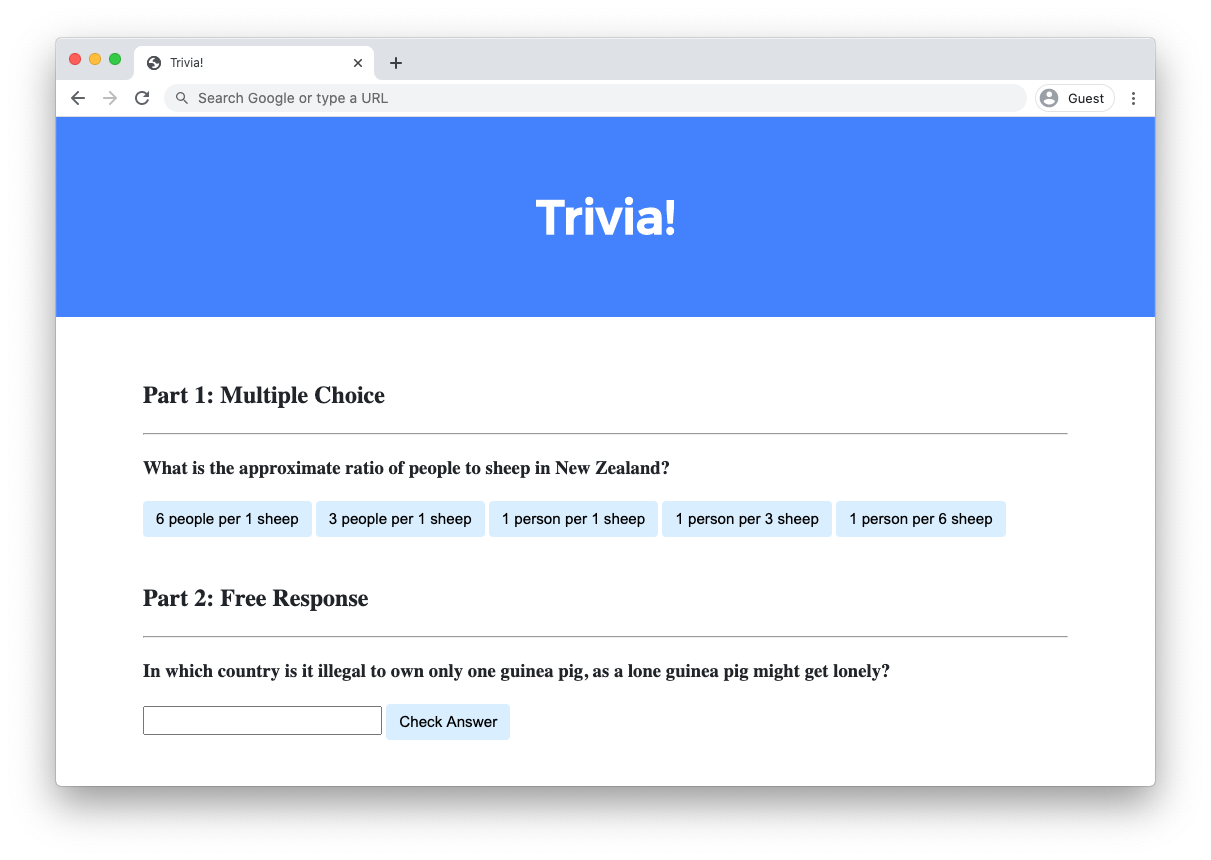
使用 HTML、CSS 和 JavaScript 设计一个网页,让用户可以回答问答问题。
- 在
index.html中,在 “Part 1” 下方使用 HTML 添加一个你自己选择的多项选择问答问题.- 你应该使用一个
h3标题来表示你的问题的文字。 - 你应该为每个可能的答案选项设置一个
button。答案选项应至少有三个,其中恰好有一个应该是正确的.
- 你应该使用一个
- 使用 JavaScript,添加逻辑让按钮在用户点击时变色.
- 如果用户点击了一个错误答案的按钮,该按钮应该变红,并且问题下方应该显示文字 “Incorrect”.
- 如果用户点击了正确答案的按钮,该按钮应该变绿,并且问题下方应该显示文字 “Correct!”.
- 在
index.html中,在 “Part 2” 下方使用 HTML 添加一个你自己选择的基于文本的自由回答问题.- 你应该使用一个
h3标题来表示你的问题的文字。 - 你应该使用一个
input字段让用户输入回答. - 你应该使用一个
button让用户确认他们的答案.
- 你应该使用一个
- 使用 JavaScript,添加逻辑让文本字段在用户确认答案时变色.
- 如果用户输入了错误答案并按下确认按钮,文本字段应该变红,并且问题下方应该显示文字 “Incorrect”.
- 如果用户输入了正确答案并按下确认按钮,输入字段应该变绿,并且问题下方应该显示文字 “Correct!”.
可选地,你也可以:
- 编辑
styles.css来更改你网页的 CSS! - 如果你愿意,可以向你的问答测验中添加额外的问答问题!
讲解视频
此视频录制时课程仍在使用 CS50 IDE 编写代码。虽然界面可能与你的 codespace 有所不同,但两种环境的行为应该大致相似!
提示
- 使用
document.querySelector来查询单个 HTML 元素. - 使用
document.querySelectorAll来查询匹配某个条件的多个 HTML 元素。该函数返回一个包含所有匹配元素的数组.
不知道如何解答?
测试
本题没有 check50,因为实现方式会根据你的问题而有所不同!但请务必对每个问题的错误和正确答案都进行测试,以确保你的网页能够正确响应.
在终端中进入你的 trivia 目录后运行 http-server,以启动一个提供网页服务的 web 服务器.
如何提交
在终端中执行以下命令提交你的作业,并按提示完成操作。
submit50 cs50/problems/2026/x/trivia
想查看工作人员提供的解答吗?你可以在这里找到两种解答该问题的方法!
使用 JavaScript 创建事件监听器
<!DOCTYPE html>

<html lang="en">
    <head>
        <link href="https://fonts.googleapis.com/css2?family=Montserrat:wght@500&display=swap" rel="stylesheet">
        <link href="styles.css" rel="stylesheet">
        <title>Trivia!</title>
        <script>

            // Wait for DOM content to load
            document.addEventListener('DOMContentLoaded', function() {

                // Get all elements with class "correct"
                let corrects = document.querySelectorAll('.correct');

                // Add event listeners to each correct button
                for (let i = 0; i < corrects.length; i++) {
                    corrects[i].addEventListener('click', function() {

                        // Set background color to green
                        corrects[i].style.backgroundColor = 'Green';

                        // Go to parent element of correct button and find the first element with class "feedback" which has that parent
                        corrects[i].parentElement.querySelector('.feedback').innerHTML = 'Correct!';
                    });
                }

                // When any incorrect answer is clicked, change color to red.
                let incorrects = document.querySelectorAll(".incorrect");
                for (let i = 0; i < incorrects.length; i++) {
                    incorrects[i].addEventListener('click', function() {

                        // Set background color to green
                        incorrects[i].style.backgroundColor = 'Red';

                        // Go to parent element of correct button and find the first element with class "feedback" which has that parent
                        incorrects[i].parentElement.querySelector('.feedback').innerHTML = 'Incorrect';
                    });
                }

                // Check free response submission
                document.querySelector('#check').addEventListener('click', function() {
                    let input = document.querySelector('input');
                    if (input.value === 'Switzerland') {
                        input.style.backgroundColor = 'green';
                        input.parentElement.querySelector('.feedback').innerHTML = 'Correct!';
                    }
                    else {
                        input.style.backgroundColor = 'red';
                        input.parentElement.querySelector('.feedback').innerHTML = 'Incorrect';
                    }
                });
            });
        </script>
    </head>
    <body>
        <div class="header">
            <h1>Trivia!</h1>
        </div>

        <div class="container">
            <div class="小组课">
                <h2>Part 1: Multiple Choice </h2>
                <hr>
                <h3>What is the approximate ratio of people to sheep in New Zealand?</h3>
                <button class="incorrect">6 people per 1 sheep</button>
                <button class="incorrect">3 people per 1 sheep</button>
                <button class="incorrect">1 person per 1 sheep</button>
                <button class="incorrect">1 person per 3 sheep</button>
                <button class="correct">1 person per 6 sheep</button>
                <p class="feedback"></p>
            </div>

            <div class="小组课">
                <h2>Part 2: Free Response</h2>
                <hr>
                <h3>In which country is it illegal to own only one guinea pig, as a lone guinea pig might get lonely?</h3>
                <input type="text"></input>
                <button id="check">Check Answer</button>
                <p class="feedback"></p>
            </div>
        </div>
    </body>
</html>
使用 HTML 创建事件监听器
<!DOCTYPE html>

<html lang="en">
    <head>
        <link href="https://fonts.googleapis.com/css2?family=Montserrat:wght@500&display=swap" rel="stylesheet">
        <link href="styles.css" rel="stylesheet">
        <title>Trivia!</title>
        <script>
            function checkMultiChoice(event) {

                // Get the element which triggered the event
                let button = event.target;

                // Check if the element's inner HTML matches expected answer
                if (button.innerHTML == '1 person per 6 sheep') {
                    button.style.backgroundColor = 'Green';
                    button.parentElement.querySelector('.feedback').innerHTML = 'Correct!';
                }
                else {
                    button.style.backgroundColor = 'Red';
                    button.parentElement.querySelector('.feedback').innerHTML = 'Incorrect';
                }
            }

            function checkFreeResponse(event) {

                // Get the element which triggered the event
                let button = event.target;

                // Get the input element corresponding to the button
                let input = button.parentElement.querySelector('input');

                // Check for correct answer
                if (input.value === 'Switzerland') {
                    input.style.backgroundColor = 'Green';
                    input.parentElement.querySelector('.feedback').innerHTML = 'Correct!';
                }
                else {
                    input.style.backgroundColor = 'Red';
                    input.parentElement.querySelector('.feedback').innerHTML = 'Incorrect';
                }
            }
        </script>
    </head>
    <body>
        <div class="header">
            <h1>Trivia!</h1>
        </div>

        <div class="container">
            <div class="小组课">
                <h2>Part 1: Multiple Choice </h2>
                <hr>
                <h3>What is the approximate ratio of people to sheep in New Zealand?</h3>
                <button onclick="checkMultiChoice(event)">6 people per 1 sheep</button>
                <button onclick="checkMultiChoice(event)">3 people per 1 sheep</button>
                <button onclick="checkMultiChoice(event)">1 person per 1 sheep</button>
                <button onclick="checkMultiChoice(event)">1 person per 3 sheep</button>
                <button onclick="checkMultiChoice(event)">1 person per 6 sheep</button>
                <p class="feedback"></p>
            </div>

            <div class="小组课">
                <h2>Part 2: Free Response</h2>
                <hr>
                <h3>In which country is it illegal to own only one guinea pig, as a lone guinea pig might get lonely?</h3>
                <input type="text"></input>
                <button onclick="checkFreeResponse(event)">Check Answer</button>
                <p class="feedback"></p>
            </div>
        </div>
    </body>
</html>